



What Is llms.txt and Why Does It Matter for AI Search?
Written By Virtuosity Editor Team
Updated 08 June 2026
If you have ever wondered why some websites show up in AI overviews and search results, and others do not, the answer might be hiding in a simple text file called llms.txt. As AI tools like ChatGPT, Claude, and Perplexity become the new way people search for information online, website owners need a new strategy to stay visible. You have probably spent months working on your website SEO by writing great content, building backlinks, and optimizing meta tags, but here is an important question: Is your website actually visible to AI? Tools like ChatGPT, Claude, and Perplexity now answer millions of search queries every day by pulling information directly from websites. If your site is not structured in a way that AI can clearly read and understand, your content may never appear in those answers. That is where the llms.txt file comes in. It helps AI language models understand who you are, what you offer, and which pages matter most.
In this blog, you will learn what llms.txt is, how it works, why it matters for AI search, how to create one, its SEO benefits, and answers to common questions.
What is llms.txt?
The llms.txt file is a plain text document that you place in the root directory of your website, usually at yourdomain.com/llms.txt, similar to how you already use robots.txt or sitemap.xml. Its purpose is to give Large Language Models (LLMs), the technology behind AI tools, a clean, organized summary of your website’s content, pages, and purpose.
Think of it this way. Websites are built for humans and often include navigation menus, cookie banners, pop-ups, and JavaScript that can make content harder for AI models to process. The llms.txt file solves this problem by presenting the most important information in a simple, structured format. The standard was proposed by Jeremy Howard, co-founder of fast.ai, in 2024, and it quickly gained attention among developers, SEOs, and content creators exploring AI search.
llms.txt vs robots.txt — What Is the Difference?
Many people confuse llms.txt with robots.txt, but they do different jobs.
| Feature | robots.txt | llms.txt |
|---|---|---|
| Purpose | Tells web crawlers which pages they can or cannot access | Explains what the website is about for AI models |
| Format | Custom text-based syntax | Markdown format |
| Used By | Google, Bing, and other search engine crawlers | AI models and AI-powered search tools |
| Main Role | Blocks or allows access to pages and resources | Describes and summarizes website content |
| Required | Commonly recommended | Optional but becoming more important |
Why Was the llms.txt File Created?
When Google's web crawler visits your website, it can easily understand messy HTML and complex page layouts. But AI models work differently. Modern websites are made for people and often contain navigation menus, cookie banners, pop-ups, ads, and JavaScript elements. When AI tries to read a webpage, it must go through all of this extra content before finding the main information. Since AI models use processing space called tokens, unnecessary content can waste their capacity.
The llms.txt file was created to solve this problem. Instead of forcing AI to figure out your website page by page, you provide a clear summary of your site’s purpose, key pages, and important content in one structured format that AI can understand quickly and accurately. It is like handing someone a well-organized table of contents instead of a messy stack of papers.
How Does the llms.txt File Work?
The llms.txt file sits at yourdomain.com/llms.txt and is written in Markdown format, making it both human-readable and easy for AI models to parse. It uses simple formatting such as headers, bullet points, descriptions, and links to organize information clearly. Here is how each part works in practice.
Step 1: The Site Title and Description
At the top of your llms.txt file, add your website name as a main heading, followed by a short description of what your website does. This is usually the first part AI reads, so keep it clear and specific.
Step 2: Core Pages Section
Next, add the main pages of your website with a short explanation of what each page is about. These can include your homepage, about page, services page, or important resource pages. This helps AI understand your website structure and identify the pages that matter most.
- Home: The main page of the website that gives visitors a general overview of your content, services, and resources.
- About: A page where users can learn about your team, company background, mission, or story.
- Resources: A page that offers useful materials such as free guides, templates, checklists, and tools.
- Contact: A page that allows users to contact your team for questions, support, or partnerships.
Step 3: Content Sections
After that, add sections for your main content, such as blog posts, guides, tutorials, or documentation. This helps AI understand the main topics your website talks about and the type of content you provide. With this, the website groups content into categories like blog posts and guides. This makes it easier for AI to understand what topics the website covers and what kind of information users can find.
Step 4: Optional Excluded Pages
You can also add pages that you do not want AI to focus on or pay attention to. These are usually pages that are not useful for search results or for understanding the content.
Optional: Excluded
- Login: The login page where users sign in to their accounts.
- Dashboard: A private page that users see after logging in, usually containing account information or settings.
- Thank You: A confirmation page is shown after a form submission, purchase, or signup.
In this example, these pages are excluded because they do not contain important public content. This helps AI focus more on your valuable pages, such as blog posts, guides, product pages, and service pages.
These four sections create a simple and well-organized llms.txt file that helps AI understand your website more clearly. The image below shows the typical syntax and structure of an llms.txt file, making it easier to visualize how the information is arranged in practice.
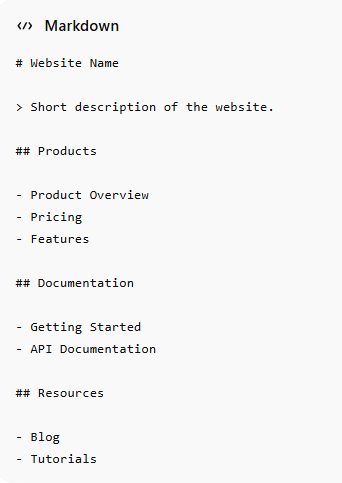
These four sections create a simple and well-organized llms.txt file that helps AI understand your website more clearly.
Top llms.txt Generator Tools Available Today
If your website has many pages, creating the llms.txt file manually can take time. In that case, an llms.txt generator can make the process faster and easier.
1. llmstxt.io: This tool lets you enter your website domain and automatically creates an llms.txt file by reading your website content and sitemap. You can review and edit the file before downloading it. It is useful for blogs, business websites, and smaller sites.
2. Firecrawl llms.txt Generator: Firecrawl is mainly designed for developers. It reads your sitemap and important pages to create a detailed Markdown file. It works well for documentation websites, SaaS platforms, and websites with many pages.
3. Manual Creation in Any Text Editor: If you have a small website, you can create the file yourself using tools like Notepad, VS Code, or any plain text editor. Simply follow the structure explained earlier, save the file as llms.txt, and upload it to your website’s root folder.
4. WordPress AI SEO Plugins: Some newer WordPress SEO plugins now include built-in llms.txt generation features. If you already use an SEO plugin, check its latest updates for AI-related tools.
Benefits of the llms.txt File for Your Website
Let's explore some primary benefits of adding llms.txt
- Better Visibility in AI-Generated Search Answers: AI tools like Perplexity and ChatGPT actively pull information from websites when answering user questions. A well-structured llms.txt file can increase the chances of your website being used as a source, helping your brand appear in front of users who may never click on traditional search results.
- You Control How AI Describes Your Site: Without an llms.txt file, AI models try to understand your website by looking at different pages, cached content, or whatever they find first. This can sometimes lead to incorrect or incomplete descriptions. With an llms.txt file, you can provide a clearer explanation of your website and guide AI to understand your content.
- Smarter Token Usage Means More Content Gets Read: AI models have processing limits. When they spend less time reading website clutter and more time focusing on your actual content, they can understand more of your information, knowledge, and expertise.
- Early Mover Advantage in AI SEO: Many websites still do not use the llms.txt file. Setting one up early can give your website a competitive advantage while other businesses and competitors are still adapting to AI SEO.
Tips to Write a High Quality llms.txt File
Using a generator is a good starting point, but the quality of your llms.txt file still matters. Here are some simple ways to make your file more useful for AI.
1. Be Specific in Every Description: Try to be clear and detailed when describing your website or pages. A description like “a marketing blog” is too broad. A description such as “a blog for ecommerce store owners covering Facebook Ads, Google Shopping, email marketing, and conversion optimization” gives AI a much better understanding of your content, audience, and topics.
2. Put Your Best Pages at the Top: AI models usually read files from top to bottom. This means your most important pages should appear first. Add your main pages, high-traffic content, or strongest resources near the top, so AI sees them quickly.
3. Match Your Page Summaries to User Search Intent: When writing page descriptions, think about what users are actually searching for. Write short summaries that clearly explain how that page helps answer a user’s question.
4. Treat It as a Living Document: Your website changes over time, and your llms.txt file should change too. Review and update it whenever you publish important content, launch a new service, or remove outdated pages.
Final Thoughts
AI search is growing quickly, and websites that adapt early may gain a real advantage. The llms.txt file is a simple way to help AI understand, describe, and use your content more accurately. Whether you create it manually or use a generator, setting up an llms.txt file now can improve your website’s visibility in the future of AI-driven search.
FAQs
Que 1) What is llms.txt?
Ans) The llms.txt file is a plain-text Markdown file placed at yourdomain.com/llms.txt. It helps AI tools like ChatGPT, Claude, and Perplexity understand your website by providing a clear summary of your content, important pages, and website purpose in a simple, structured format.
Que 2) How do I create an llms.txt file for my website?
Ans) To create an llms.txt file, use any plain text editor or tool. Add your website name, a short description, important pages, and content links using Markdown format. Save it as llms.txt and upload it to your website’s root directory.
Que 3) Does llms.txt help with Google SEO?
Ans) The llms.txt file is not a direct Google ranking factor. However, it can support AI visibility by helping AI systems understand your website better, which may improve brand exposure, citations, and indirect SEO benefits over time.
Que 4) Which AI tools actually read llms.txt files?
Ans) AI tools such as ChatGPT with web browsing, Perplexity AI, and other web-connected LLM tools can read llms.txt files. Adoption is still growing, but creating one now helps prepare your website for future AI search developments.
Que 5) Is llms.txt the same as robots.txt?
Ans) No, llms.txt and robots.txt are different. The robots.txt file controls crawler access to website pages, while llms.txt explains your website’s content, purpose, and important pages to AI models. Both files can exist together on the same website.