


What Is Mobile App Development? Types, Cost & Process
Written By Virtuosity Editor Team
Updated 11 August 2026
There are more than six billion smartphone users in the world, and almost every one of them opens dozens of apps every single day. Some order food, some book flights, while others transfer money or learn new skills with just a few taps. But have you ever wondered what it actually takes to build an app that millions of people can use without thinking twice? It is not just about writing code or designing attractive screens. Behind every successful app is a complete mobile app development process that turns an idea into a fast, secure, and user-friendly product. In this blog, you'll learn what mobile app development is, how it works, its types, costs, tools, trends, and key challenges.
Mobile app development is the process of designing, building, testing, launching, and maintaining applications for smartphones and tablets. These apps are developed for platforms such as Android and iOS, including native apps built specifically for one operating system, and are distributed through app stores like Google Play and the Apple App Store. Developers use programming languages such as Swift for iOS and Kotlin or Java for Android, while frameworks like Flutter and React Native allow a single app to run on both platforms.
Mobile app development covers three main areas working together:
-
User Experience (UX) and User Interface (UI) Design: Creating an app that is easy to use and visually appealing, so a first-time user does not feel lost or confused.
-
Backend Development: Building the server-side systems that power the app behind the scenes, such as databases, user accounts, and cloud storage.
-
Quality Assurance (QA): Testing the app on different phones and network speeds to catch bugs and crashes before real users ever see them.
Types of Mobile Apps
Choosing the right type of app is one of the first major decisions in mobile application development, and it affects cost, timeline, and how the app performs on a user's phone.
1) Native Apps
Native apps are built specifically for one operating system using that platform's own language and tools: Kotlin or Java for Android and Swift for iOS. Because they are built directly for a single platform, they load faster and use the camera, GPS, and sensors more smoothly. Popular apps like YouTube and Google Maps rely heavily on native development.
2) Hybrid Apps
Hybrid apps are built using web technologies such as HTML, CSS, and JavaScript, then wrapped inside a native shell so they can be installed like a regular app. The backend, the part that runs on a server rather than on the phone, often stays the same across platforms, which saves development time and cost, though hybrid apps can feel slightly less smooth for graphics-heavy tasks.
3) Cross-Platform Apps
Cross-platform apps use a single codebase, meaning one set of code, to run on both Android and iOS. Tools like Flutter and React Native let developers write the app once and deploy it almost everywhere, cutting both development time and cost while still giving users an experience that feels close to native.
4) Progressive Web Apps (PWA)
A Progressive Web App, or PWA, is essentially a website that behaves like an app. It can be added to a phone's home screen, works even on weak internet, and does not need to be downloaded from an app store at all, making it a good fit for basic app-like features without the full cost of mobile app development.
Native vs Hybrid vs Cross Platform vs PWA
| Type | Languages Used | Pros | Cons | Best For |
|---|---|---|---|---|
| Native | Swift / Objective-C (iOS), Kotlin / Java (Android) | Best performance, full access to device features, smoothest user experience | Needs separate code for Android and iOS, higher cost and time | Apps needing high performance, like games or camera-heavy apps |
| Hybrid | HTML, CSS, JavaScript wrapped in a native shell | Faster and cheaper to build, one codebase for most features | Can feel less smooth for graphics-heavy or complex apps | Simple apps with limited budget and timeline |
| Cross Platform | Dart (Flutter), JavaScript (React Native) | One codebase for Android and iOS, close to native feel, faster launch | Slightly heavier app size, occasional platform-specific quirks | Startups wanting both platforms without doubling the budget |
| PWA | HTML, CSS, JavaScript (runs in browser) | No app store needed, works on weak internet, easy to update | Limited access to device hardware, weaker offline performance | Simple business apps or content sites wanting an app-like feel |
The Mobile App Development Process
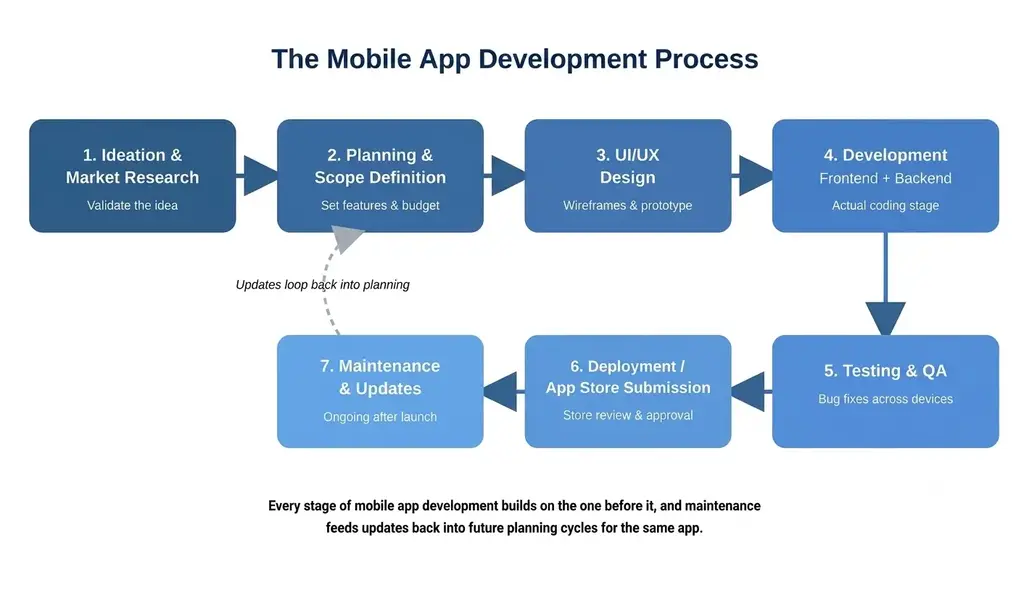
Every app, no matter how simple or complex, tends to move through the same broad stages of app development. Understanding these stages helps founders, students, and even non-technical business owners know what actually goes into building an app from scratch.
Step 1) Ideation & Market Research
Every app starts as an idea, but a good idea alone is not enough. This stage involves researching whether the problem the app solves is real, checking what similar apps already exist, and understanding who the target users are. For example, a startup planning a grocery delivery app in Tier 2 Indian cities would study local buying habits and existing competitors before writing a single line of code.
Step 2) Planning & Scope Definition
This stage answers one key question: exactly what will the first version of the app do, and what will it deliberately leave out for later? The team lists the must-have features, sets a realistic budget, and decides which platform to launch first: Android, iOS, or both together. Getting the scope clear and written down before development starts is what prevents expensive changes and delays once coding has already begun.
Step 3) UI/UX Design
This stage focuses on how the app looks and how it feels to use. Designers create wireframes, which are simple sketches of each screen, followed by detailed visual designs and a working prototype that stakeholders can click through before any code is written. Good UI UX design ensures users find the app easy to navigate rather than confusing.
Step 4) Development (Frontend + Backend)
This is where the actual coding happens. Frontend refers to everything the user sees and taps on their phone screen, while backend refers to the server, database, and logic running behind the scenes that the user never directly sees. A ride-hailing app, for instance, needs a smooth frontend map interface along with a powerful backend that tracks driver locations in real time.
Step 5) Testing & QA
Before launch, the app goes through Quality Assurance, or QA, where testers check for bugs, crashes, and performance issues across different phone models and screen sizes. This stage also confirms the app works properly on slower internet connections, which matters a great deal in a market like India with widely varied network quality.
Step 6) Deployment / App Store Submission
Once testing is complete, the app is submitted to Google Play or the Apple App Store for review. Each store has its own guidelines around privacy, security, and content, and apps can be rejected if these are not followed carefully. Only after approval does the app become publicly available for download.
Step 7) Maintenance & Updates
Mobile application development does not end at launch. Apps need regular updates to fix bugs, support new phone models, add features, and stay compatible with new operating system versions. Popular apps release updates every few weeks to keep users engaged and to respond to feedback left in app store reviews.
Tech Stack & Tools by Platform
A tech stack simply means the group of programming languages and tools used to actually build an app. Which stack a business needs depends entirely on which platform, or platforms, they are targeting.
-
iOS: Swift and Objective-C: Apps built for iPhones mostly use Swift, Apple's own modern programming language, because it is designed specifically to work fast and safely on Apple devices. Some older iOS apps still run on Objective-C, an earlier language, though most new development today happens in Swift.
-
Android: Kotlin and Java: Apps built for Android phones mostly use Kotlin today, Google's preferred language for Android development, though many existing apps were originally written in Java and still use it. Kotlin is generally considered easier to write and less prone to certain common bugs than Java.
-
Cross Platform: Flutter and React Native: When a business wants one app to work on both Android and iOS without building two separate apps, developers turn to cross-platform tools like Flutter, built by Google, or React Native, built by Meta. Both let a team write one codebase and launch it on both platforms, which is why cost-conscious startups often prefer this route.
-
Backend and Cloud: Firebase and AWS Amplify: This is the part users never see: the servers and databases that store information and make features like login, chat, or payments actually work. Tools like Firebase and AWS Amplify give smaller teams ready-made building blocks for user accounts, data storage, and push notifications, so they do not need to build this entire system from scratch.
Cost to Build a Mobile App in India
-
Simple App: A simple app, such as a basic informational app, typically costs between Rs 50,000 and Rs 3,00,000 when built by an Indian development team, covering a small number of screens and basic backend needs.
-
Medium Complexity App: A medium complexity app, such as a food ordering or booking app with payments and notifications, generally costs between Rs 3,00,000 and Rs 10,00,000, depending on design and features included at launch.
-
Complex App: A complex app, such as a full-scale marketplace or ride-hailing platform with heavy backend logic, can cost anywhere from Rs 10,00,000 to well over Rs 50,00,000, especially if it needs both Android and iOS support along with an admin panel and analytics dashboard.
India remains one of the most cost-effective markets globally for mobile application development, with hourly rates for Indian developers often running at a fraction of rates in the United States or Western Europe, which is one reason many international businesses outsource development work to Indian teams (Statista, Mobile App Usage).
Key Trends in Mobile App Development
Mobile app development keeps evolving, and a few trends are shaping how apps are built and used right now.
-
AI/ML Integration: Artificial Intelligence and Machine Learning are now built directly into many apps, powering features like personalized recommendations, chatbots, and voice search. Shopping apps use AI to suggest products based on browsing history, while banking apps use it to detect unusual transactions, and even small businesses are adding smart features without needing a dedicated data science team.
-
5G Networks: With 5G networks expanding across Indian cities, apps can now support richer experiences such as high-quality video streaming, real-time multiplayer gaming, and instant file sharing without lag. Developers are starting to design features that specifically take advantage of these faster speeds, something that was not practical on slower 4G connections.
-
Cross Platform Tooling: Frameworks like Flutter and React Native continue to mature, making cross-platform apps look and feel closer to fully native ones every year. This matters because it lets businesses reach both Android and iOS users without doubling their development budget, which is especially valuable for startups working with limited funding.
-
Low Code and No Code Platforms: Low code and no code platforms allow people with little or no coding background to build simple apps using drag-and-drop tools. While these platforms are not suited for complex apps, they help small business owners and non-technical founders launch basic apps quickly to test an idea before investing in full-scale mobile app development.
Common Challenges in Mobile App Development
-
Platform Fragmentation: Android alone runs on thousands of phone models with different screen sizes and operating system versions. This fragmentation means developers must test extensively across budget and high-end devices, which adds time and cost to development.
-
Security: Apps often handle sensitive data such as passwords and payment details, making security a constant concern. Weak security can lead to data leaks or fraud, so proper encryption and regular security testing are essential parts of mobile application development, not optional extras.
-
App Store Approval: Google Play and the Apple App Store both have detailed guidelines around privacy, content, and functionality. Apps can be rejected or delayed if these are not met, so teams need to plan for review time before submission.
-
User Retention: Getting users to download an app is only half the challenge. Many apps lose a large share of users within the first few days if onboarding feels confusing, which is why user experience matters so much after launch.
Ready to Turn Your App Idea Into Reality? Get a free consultation and a clear cost estimate tailored to your app idea.
FAQs
Que 1) What is the difference between mobile app development and web development?
Ans) Mobile app development creates software installed directly on a phone through an app store, while web development builds websites accessed through a browser. Mobile apps can use device features like GPS, camera, and push notifications more deeply, whereas websites work across any device with a browser but usually offer fewer native device capabilities.
Que 2) How long does it take to build a mobile app?
Ans) A simple app can take around 6 to 10 weeks to build, while a medium complexity app usually takes 3 to 5 months. Complex apps with advanced features and multiple platforms can take 6 months or longer, depending on the scope, the size of the development team, and how many rounds of testing are needed.
Que 3) Do I need to know coding to build an app?
Ans) Not necessarily. Low code and no code platforms let you build simple apps using visual tools without writing code. However, for more complex or scalable apps, working with developers who understand native or cross-platform coding is usually required to build something reliable and secure enough for real users.
Que 4) What is the best programming language for mobile app development?
Ans) There is no single best language; it depends on the platform. Swift is preferred for iOS, Kotlin is preferred for Android, and Flutter or React Native are popular when building for both platforms using one codebase. The right choice depends on the target audience and the budget available.
Que 5) What is the difference between native and hybrid apps?
Ans) Native apps are built specifically for one operating system using that platform's own language, offering better performance and smoother access to device features. Hybrid apps use web technologies wrapped inside a native shell, making them faster and cheaper to build, though they can feel slightly less polished than native apps.